1Your Heropost link
In Heropost, open Home → Connect your AI tools → ChatGPT and press Copy. You get your link. The link is the key — no sign-in, no token.
2Where it goes in ChatGPT
On chatgpt.com
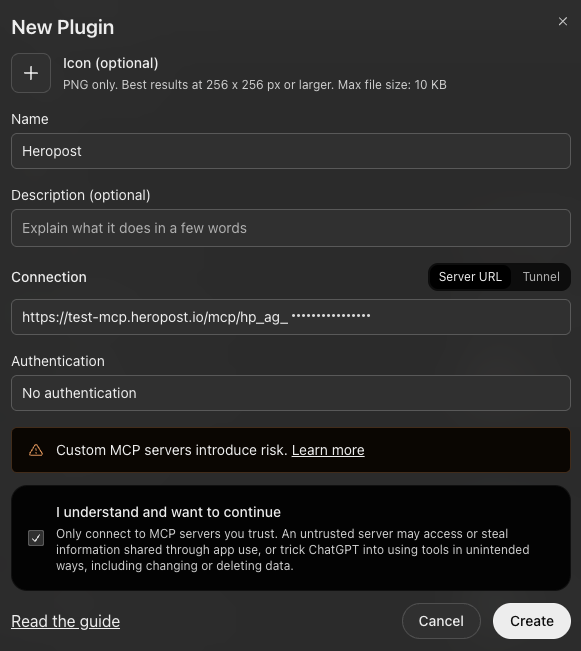
- Open Settings → Plugins → Browse plugins and press +. The New Plugin window opens.
- Name it Heropost. Leave Connection on Server URL and paste your link.
- Set Authentication to No authentication — OAuth won’t work with Heropost.
- Tick I understand and want to continue and press Create.
In the ChatGPT app for Mac
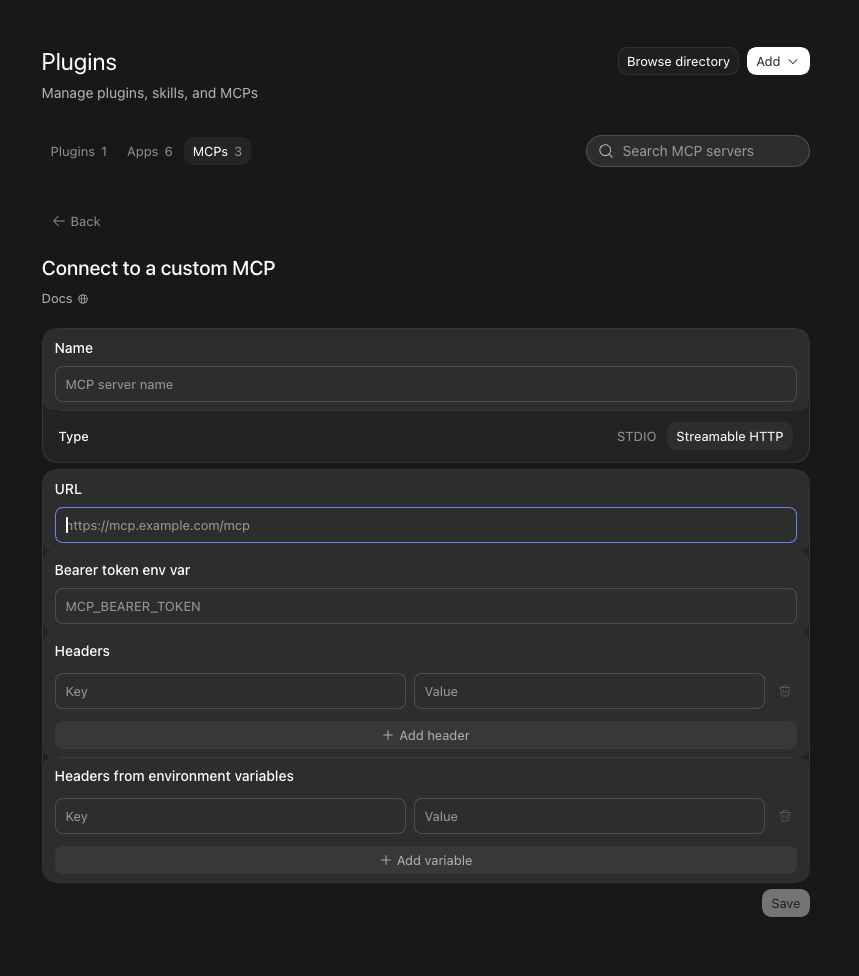
- Open Settings → Plugins, go to MCPs and press Add.
- Name it Heropost and set Type to Streamable HTTP.
- Paste your link into URL. Leave Bearer token env var and Headers empty.
- Press Save.
3Try it
Ask ChatGPTUse Heropost to create a draft post for Friday about …
In ChatGPT, start with “Use Heropost…” when you want something saved. Asked more loosely, it writes the post in the chat and nothing reaches Heropost.
Then open Connect your AI tools → Activity in Heropost. A saved draft shows as create post · 1 action.
Good to know
- Who can connect
- Workspace owners and admins — they’re the ones who see Connect your AI tools.
- How many tools
- Every Heropost plan connects up to 3 AI tools, counted across all your workspaces. Agent Pro connects 10; Agent Agency has no limit. All in use? Remove one in the workspace where it’s connected, under Connect your AI tools → Your tools.
- What it can do
- You choose, in Your tools → ChatGPT → Permissions: drafts are always allowed; publishing, reading the inbox and which accounts are yours to switch. Replying in the inbox is on Agent Pro and Agency.
- The link is the key
- It’s shown once. New link replaces it and the old one stops working instantly; Remove cuts ChatGPT off.
- What it costs
- One action is one post saved or one reply sent. Reading, reporting and the writing itself are free.
- ChatGPT says the MCP server does not implement OAuth.
- Authentication was left on OAuth. Add Heropost again with Authentication set to No authentication.
- Your screen looks different?
- Tell support, with a screenshot and any error text. We update this guide from real screenshots.
Last checked: chatgpt.com and the ChatGPT app for Mac (add screens Sep 29, 2026; full test Sep 17, 2026), on a real Heropost workspace.