1Your Heropost link
In Heropost, open Home → Connect your AI tools → Cursor and press Copy. You get the ready-made snippet, with your link inside. The link is the key — no sign-in, no token.
2Where it goes in Cursor
- In the Cursor app, open Customize → MCPs and press New MCP Server. Cursor opens
~/.cursor/mcp.json. - Add the
heropostentry — keep any servers already in the file — and save:
{
  "mcpServers": {
    "heropost": {
      "url": "https://mcp.heropost.io/mcp/hp_ag_…"
    }
  }
}
Once it’s saved, heropost moves to Connected on the MCPs page.

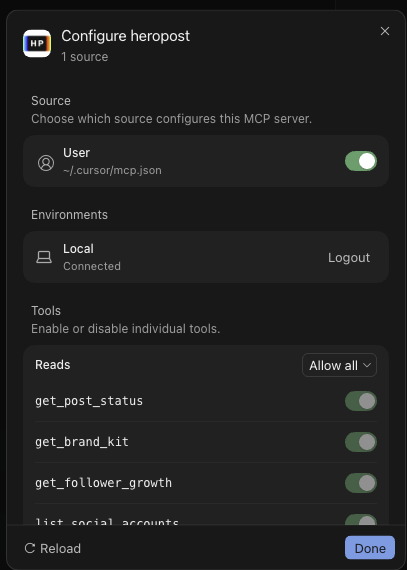
3Try it
Ask CursorUse Heropost to create a draft post for Friday about …
Say use Heropost when you want something saved.
Then open Connect your AI tools → Activity in Heropost. A saved draft shows as create post · 1 action.
Good to know
- Who can connect
- Workspace owners and admins — they’re the ones who see Connect your AI tools.
- How many tools
- Every Heropost plan connects up to 3 AI tools, counted across all your workspaces. Agent Pro connects 10; Agent Agency has no limit. All in use? Remove one in the workspace where it’s connected, under Connect your AI tools → Your tools.
- What it can do
- You choose, in Your tools → Cursor → Permissions: drafts are always allowed; publishing, reading the inbox and which accounts are yours to switch. Replying in the inbox is on Agent Pro and Agency.
- The link is the key
- It’s shown once. New link replaces it and the old one stops working instantly; Remove cuts Cursor off.
- What it costs
- One action is one post saved or one reply sent. Reading, reporting and the writing itself are free.
- Heropost shows “Error” on the MCPs page.
- Make sure
mcp.jsonis exactly the snippet from Heropost — it starts with{and ends with}— and that it’s saved. Show Output next to the error tells you why. - There’s nowhere to add it on cursor.com.
- The cursor.com dashboard has no MCP settings. Use the Cursor app.
- Your screen looks different?
- Tell support, with a screenshot and any error text. We update this guide from real screenshots.
Last checked: the Cursor app for Mac (Sep 29, 2026; full test Sep 17, 2026), on a real Heropost workspace.